How do I exclude the boot USB drive from erasure?
In most cases, you can write a small batch file to launch Active@ KillDisk with the "erase all drives" parameter -ea combined with the "exclude removable drives" parameter -xr. This will erase all fixed drives while skipping any drive recognized as removable — including the boot USB stick.
However, some USB drives report themselves to the system as fixed disks rather than removable disks. In this case, the -xr parameter will not recognize them as removable, and they will be erased along with the other drives.
If your USB stick is one of these drives, use the "Exclude Active@ Boot Disk device from erase" checkbox when creating the bootable device in Boot Disk Creator. This setting identifies the specific device used to boot the system — regardless of how it reports itself — and excludes it from erasure automatically.
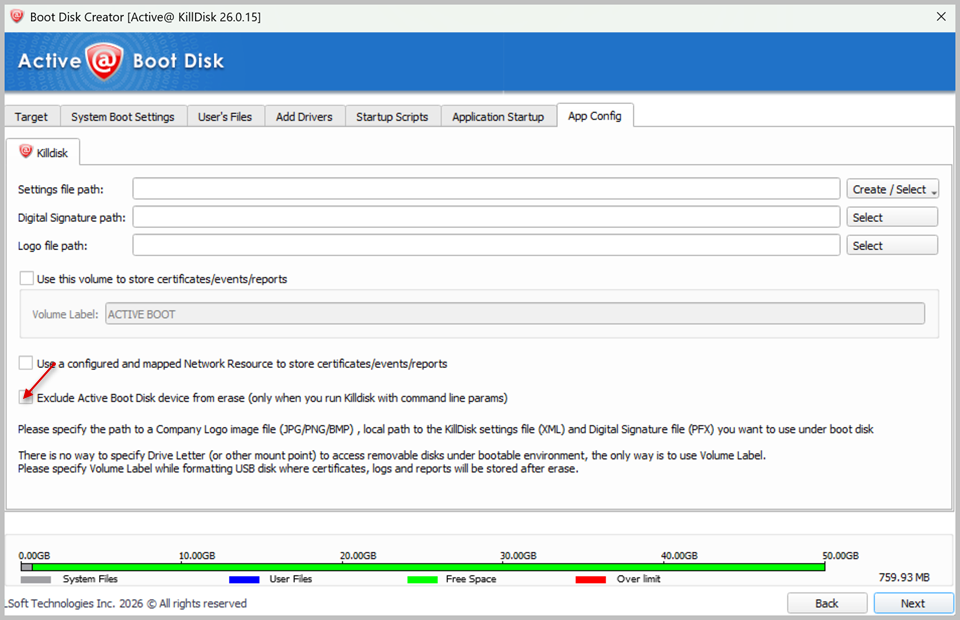
This checkbox only takes effect when KillDisk is launched with command-line parameters (for example, via a startup script or Application Startup settings). It does not apply when running an erase operation manually through the graphical interface.